
If you would like to use 1DCutX without trial version restrictions then you have to purchase the license. This is a one-time purchase, there are no recurring fees. We describe below step-by-step instruction how to proceed.
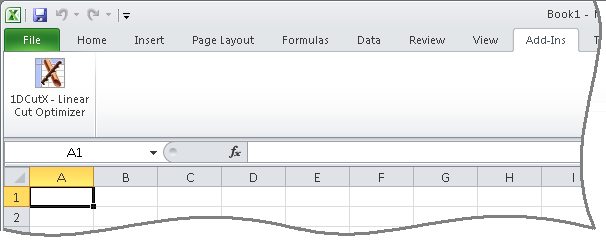
1. Select "Add-Ins" in the main menu.
2. Click on the "1DCutX - Linear Cut Optimizer" ribbon element as shown on the picture.
Please skip this step and go to step 5 if you already paid for the license.
You can purchase the License key for 1DCutX using widely-known secure online payment service PayPal.
PayPal accepts major credit cards (VISA, MasterCard and American Express).
Click here to see how to pay if you don't have a PayPal account.
Please click the PayPal icon to make a payment:
| Number of 1DCutX Licenses | Maximum Stock Sizes | Maximum Part Sizes | Price, USD (Click on Buy Now button to make a payment) |
|---|---|---|---|
| 1 | Unlimited | Unlimited |
97.00
|
| 2 | Unlimited | Unlimited |
180.00
|
| 3 | Unlimited | Unlimited |
250.00
|
| 4 | Unlimited | Unlimited |
310.00
|
| 5 | Unlimited | Unlimited |
365.00
|
| 6 | Unlimited | Unlimited |
415.00
|
| Unlimited (Site License) | Unlimited | Unlimited |
997.00
|
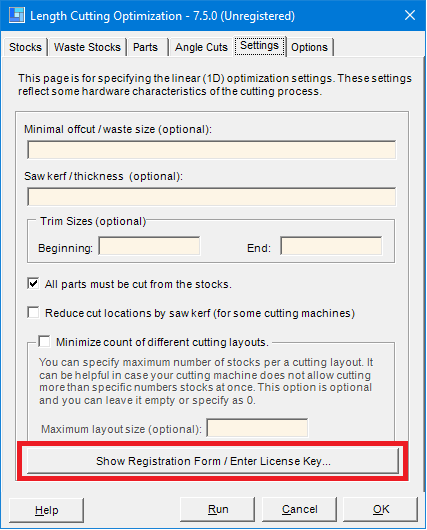
Click on the "Show Registration Form/Enter License Key..."
1. If you purchased the license for 1,2,3,4 or 5 computers then please choose the "Single License" options as shown below:
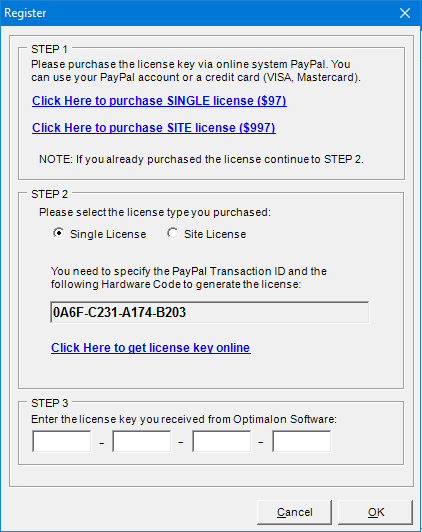
2. Get license key online using the hardware code shown on this dialog.
3. Enter the license key we generated into four edit boxes.
1. If you purchased the Site License then please choose the "Site License" options as shown below:
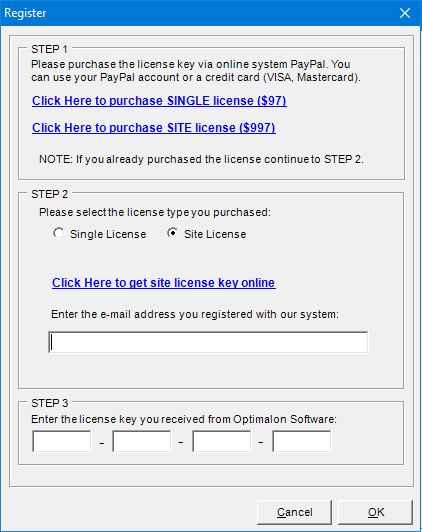
2. Get license key online using your e-mail.
3. Enter the same e-mail address that you registered on the step 2 and the license key we generated into four edit boxes.